Launch structure is guesswork
Without conversion history, campaign structure, budget, and starting bids depend heavily on personal experience.
Turn Amazon advertising data into campaigns, budgets, bids, and review actions you can execute today
From product launch to weekly optimization, connect profit boundaries, campaign structure, report matching, and effect validation with a traceable reason behind every recommendation.
Where operators get stuck
The ad console tells you what happened. It rarely answers what to create, stop, or change today.
Without conversion history, campaign structure, budget, and starting bids depend heavily on personal experience.
Campaign, targeting, search term, and advertised product reports are fragmented and easy to mismatch manually.
Without a consistent cost model, a target ACOS may already exceed the true break-even point.
Without before-and-after periods, teams cannot tell whether an executed recommendation actually worked.
Product capabilities
Six capabilities available to operators today, designed around human decisions and traceable execution.
Product launch planning
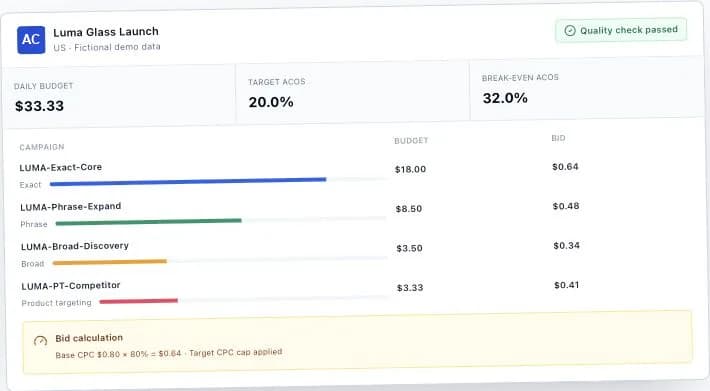
Enter product, cost, budget, and keyword data to generate an auditable, exportable ad structure.
| Campaign | Target | Match | Budget | Bid | Review window |
|---|---|---|---|---|---|
| LUMA-Exact-Core | glass coffee cup | EXACT | $18.00 | $0.64 | 7 days |
| LUMA-Phrase-Expand | glass cup with lid | PHRASE | $8.50 | $0.48 | 10 days |
| LUMA-PT-Competitor | B0DEMO2026 | ASIN | $3.33 | $0.41 | 14 days |
Advertising report review
Uploads are mapped and validated automatically, with human confirmation whenever a match is uncertain.
Profit and budget protection
Turn costs, CVR, and target ACOS into explainable CPC and budget limits.
Execution and learning loop
Keep the recommendation, action status, report snapshot, and measured outcome in one record.
Advertising report analysis
Aggregate fragmented ad data by campaign, target, search term, and advertised product to surface the issues that need action.
Advertising report comparison
Compare two report periods or entities with consistent metrics instead of manually joining spreadsheets.
| Metric | Previous period | Current period | Change |
|---|---|---|---|
| Spend | $1,420 | $1,284 | -9.6% |
| Orders | 96 | 118 | +22.9% |
| ACOS | 32.4% | 25.9% | -6.5 pp |
| CPC | $0.71 | $0.64 | -9.9% |
Use cases
From launch to stable delivery, results are organized around the decision an operator needs to make now.
Build a reliable first test structure without historical ad data.
Price, costs, budget, target ACOS, and core keywords
Campaigns, budgets, bids, review windows, and quality risks
Find search terms and targets that are consuming budget without converting.
Search Term and Targeting reports
Negate, decrease, or pause actions with trigger calculations
Evaluate ad performance inside the product's real profit model.
Complete costs and Advertised Product report
Break-even ACOS, post-ad profit, and risk status
Connect this week's actions to next week's measured outcomes.
Execution records and the next Amazon report period
Seven-day comparison, action effectiveness, and next review date
How it works
Acoscope AI provides analysis and evidence. Operators always remain in control of account execution.
Enter product and profit inputs or import keyword and competitor market data.
Create the plan, then inspect profit boundaries, confidence, and backend quality gates.
Export Excel, Amazon Bulk, or PDF, then review and act in the Amazon console.
Upload Amazon reports, generate review actions, and compare before-and-after results.
Data and account safety
Manual input keeps account permissions with the seller while estimates and uncertain matches remain visibly labeled.
Signing in to Acoscope AI never requires your Seller Central or Amazon Ads password.
Planning and review work through manual input and file uploads without account authorization.
The system does not change bids, negate keywords, pause targets, or edit budgets automatically.
Name matches and multiple candidates remain pending instead of being silently linked.
System estimates carry source and confidence labels and cannot masquerade as real market data.
FAQ
No. The current product uses manual inputs and report file uploads and does not require Amazon ad account authorization.
In the Amazon Ads console report center, choose Sponsored Products and download Campaign, Targeting, Search Term, or Advertised Product reports. Each import page includes the matching path.
Yes. Minimum product, cost, budget, and keyword inputs create a lower-confidence base plan. Confidence increases as you provide better data.
No. Every creation, bid, negation, and budget action must be reviewed and executed manually by an operator in Amazon.
Amazon advertising reports support .xlsx and .csv. Market data also supports pasted tables and common third-party export formats.
See the pricing page for current plans, trial terms, and account quotas. The live pricing page is the source of truth.
Start with a product launch plan and reduce guesswork with consistent profit, budget, and review logic.